settings
| Package | Kind | Provides the role | Needs | Choose with |
|---|---|---|---|---|
smf_settings | feature | Settings screen | a router | -m settings |
settings is the settings screen of the app: a large title and, below it, the settings that the roles and the modules of the app have, such as the theme mode and the language, in one group on a card. In an app without a setting, the screen has a note for you, the developer of the app, in place of the group.
What it adds to the app
lib/features/settings/settings_screen.dart with SettingsScreen, and one route for the router role:
| Path | / of the feature, so the full path is /settings |
| Full name | settings.settings |
| Navigation | context.nav.settings.settings() |
| Destination | Settings, with the settings icon, in the main navigation when the app has a layout |
| Start | Not a start screen; the app starts on it only with --start /settings |
The module adds no package to the app.
In the guide for coding agents of the app, the settings screen role tells under "Settings screen" what an entry is and how to add one. The module adds where its screen is, what it shows with entries and without, and how code opens it in an app without a main navigation.
The settings
A module with a setting gives the settings screen role the widget of its entry, and this module only shows the entries. They come in the order of the role: first the entries of the modules, in the order of the modules, then the entries that the roles of the app add themselves, in the order of the modules that provide those roles. The theme role adds the theme mode, and the localization role the language.
The screen shows the entries one below the other in one group, a card with a line between each two. The title and the group are in a list, which scrolls.
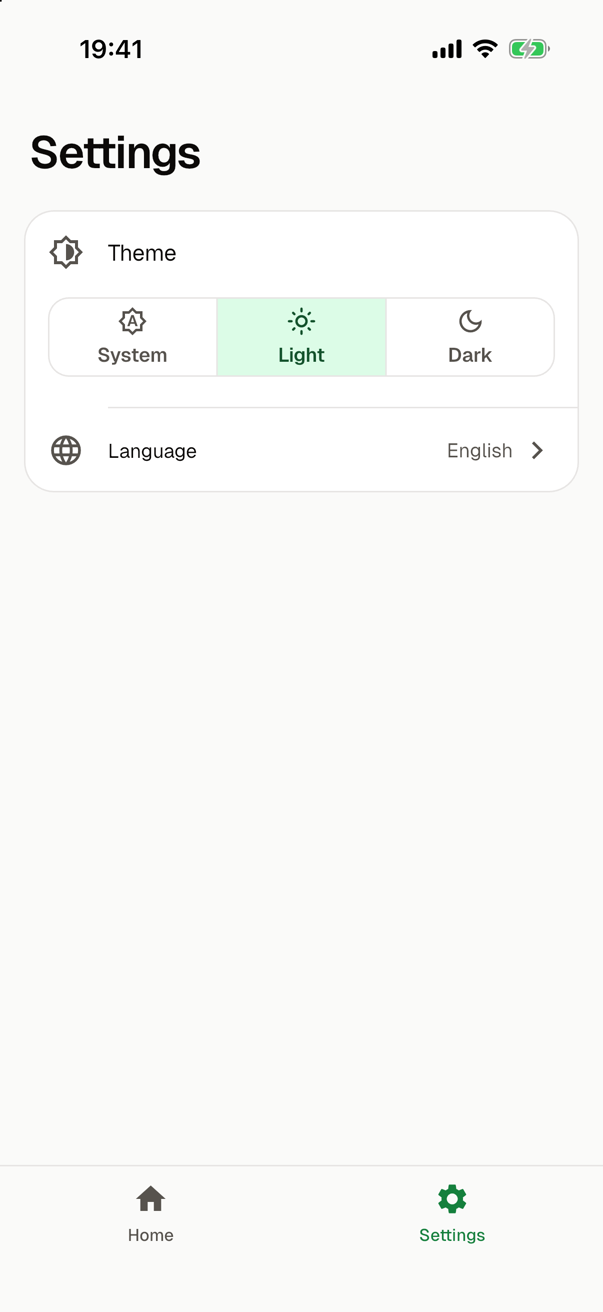
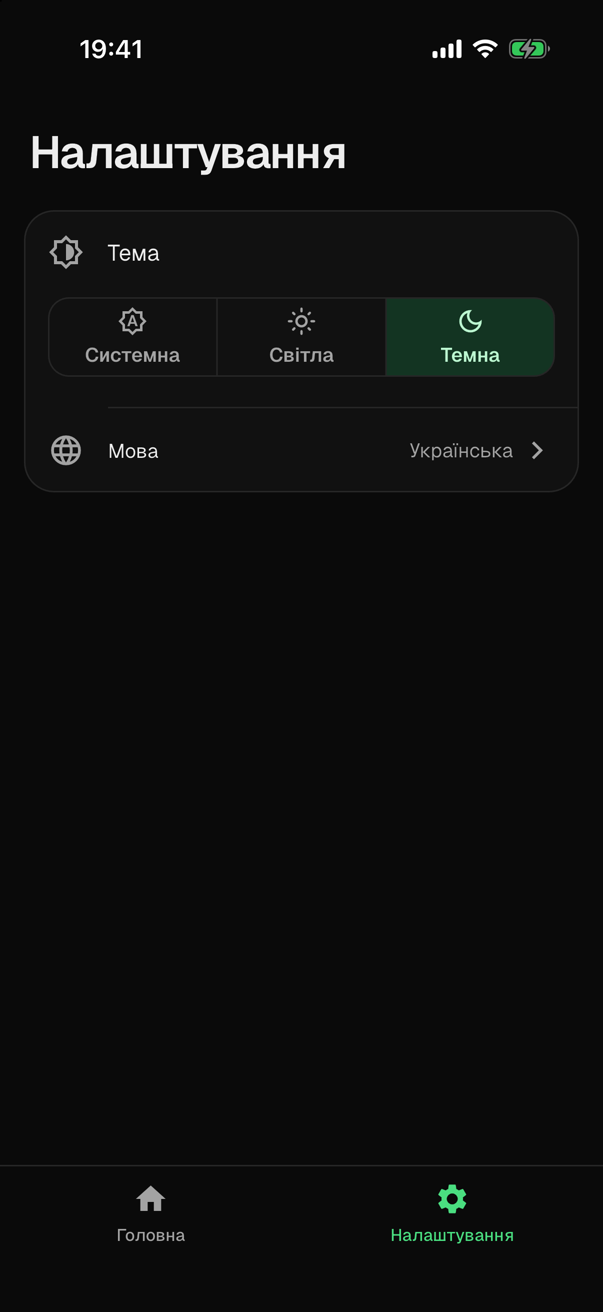
This is the file of the screen in such an app, with material_theme and gen_l10n chosen in that order, without the code of its title and of its frame:
import 'package:flutter/material.dart';
import 'package:flutter/services.dart';
import 'package:my_app/core/l10n/l10n.dart';
import 'package:my_app/core/l10n/language_setting.dart' as entry1;
import 'package:my_app/core/theme/theme_mode_setting.dart' as entry0;
// ...
child: ListView(
padding: const EdgeInsets.fromLTRB(16, 20, 16, 32),
children: [
title,
const SizedBox(height: 20),
const _Group(
children: [entry0.ThemeModeSetting(), entry1.LanguageSetting()],
),
],
),
// ...
/// The group of the entries of the screen: its [children] one below the
/// other on a card, with a line between them.
class _Group extends StatelessWidget {
const _Group({required this.children});
final List<Widget> children;
Widget build(BuildContext context) => Card(
clipBehavior: Clip.antiAlias,
child: Column(
crossAxisAlignment: CrossAxisAlignment.stretch,
children: [
for (final (index, child) in children.indexed) ...[
if (index > 0) const Divider(height: 1, indent: 56),
child,
],
],
),
);
}
The screen imports the file of each entry with a prefix of its own, such as entry0, so two entries with the same class name never clash. To add an entry of your own by hand, see Preferences and settings. Add a setting shows how a module gets its entry there.
The two entries of the roles are the same with every module that provides those roles:
| Entry | What it shows |
|---|---|
| The theme mode | Its title, and three segments below it, System, Light and Dark, each with its icon above its name. See Theme. |
| The language | A row with the choice of the user as its value. A tap opens a sheet with the languages of the app. See Languages. |
The title of the screen is a text of the module, Settings in English and Налаштування in Ukrainian, and the label of its tab is the same text. In an app without a module that provides the localization, both are in English. A screen reader announces the title as a header. A title that is too long for its line, as with a large text size, gets smaller and stays on one line.
An app without settings
In an app whose modules have no setting, the file has no group. Below the title, the screen shows a note for you:
- a picture, a cell with an icon;
- "No settings yet", and "A module with a setting adds its entry here. You can add your own in this file.";
- the path of the file,
lib/features/settings/settings_screen.dart. A tap copies it, and a snack bar says so.
The note is in English in every app. A module that provides the theme of the app, such as material_theme, or its texts, such as gen_l10n, brings a setting, so an app with one of them has the group and never the note. The first entry takes the place of the note; Preferences and settings shows the change.
The note comes in once, and at once on a device that asks for less motion. On a small phone with a large text size, the title and the note scroll, and the path grows to at most one and a half times its size.
Opening the screen
With a layout, such as bottom_tabs, the screen is a destination of the main navigation, after the destinations of the features chosen before it. There it has no app bar.
Without a layout, nothing that SMF generates opens the screen. Open it from your own code, on top of the current screen:
context.nav.settings.settings().push<void>()
Shown that way, the screen has an app bar with a back button, which leads back. go() would replace the stack with the settings screen alone, and nothing would lead back from it.
The screen is not a start screen, so an app whose only screen is this one starts on the fallback start screen, even with a layout. The fallback screen is outside the main navigation, so nothing opens the settings screen there either. Add a feature with a start screen, such as home.
Requirements
As a feature, settings requires the router role, whichever module provides it. The screen has no state of its own, since each entry keeps the state of its setting, so settings works with any module that manages state or with none.
Whichever module provides the settings screen, its route shows the screen, and the screen shows every entry once, one below the other, in a list that scrolls. SMF's CI checks this in running apps with the role; see Contributing.
Choosing it
smf create asks which module provides the settings screen, and offers None as well. The module provides a role, so it is not among the features to pick. To choose it without the question, here with a start screen and tabs at the bottom:
smf create my_app -m home,settings,bottom_tabs
No module of this app has a setting, so its screen shows the note. With material_theme or gen_l10n in -m too, it shows the group.