Notifications and push messages
Notifications and push messages are two roles of SMF, each with a module that provides it:
| Part | Role | Module | What it brings |
|---|---|---|---|
| Notifications | Notifications | local_notifications | appNotifications: the permission to show notifications, a notification now or at about a time to come, and the taps on them. |
| Push messages | Push messages | firebase_messaging | appPush: the address of the device for the backend of the app, the messages that the backend sends there, and the taps on them. |
The push role requires the notifications role, since a message in the foreground shows as a notification of the app, and the permission to show messages is that of the notifications. So firebase_messaging brings local_notifications with it while that module is the only one that provides the notifications:
smf create my_app -m home,onboarding,settings,bottom_tabs,firebase_messaging
An app can also have the notifications without push messages, with -m local_notifications.
| File | From | What it holds |
|---|---|---|
lib/core/notifications/app_notifications.dart | the notifications role | appNotifications, through which code shows notifications and asks for the permission, NotificationPermission, notificationOwnerKey and initNotifications(). It exports AppNotification and NotificationTap, so the code of the app imports this file alone. |
lib/core/notifications/notifications_service.dart | the notifications role | NotificationsService, the interface that the module that provides the role implements, AppNotification, NotificationTap, and the channel and the icon of the notifications. The code of the app does not use it. |
lib/core/notifications/notifications_setting.dart | the notifications role, in an app with a settings screen | NotificationsSetting, the entry of the settings screen. |
lib/core/notifications/notifications_step.dart | the notifications role, in an app with an onboarding | The functions of the step of the onboarding that asks for the permission. |
android/app/src/main/res/drawable/ic_notification.xml, android/app/src/main/res/raw/notifications_keep.xml | the notifications role | The small icon of a notification on Android, and the file that keeps it in a release build. |
lib/core/push/app_push.dart | the push role | appPush, through which code reads the address, the messages and the taps, and initPush(). It exports PushMessage. |
lib/core/push/push_service.dart | the push role | PushService, the interface that the module that provides the role implements, and PushMessage. The code of the app does not use it. |
bootstrap() starts both in its platform phase, after the preferences, so the app knows its permission and the tap that launched it before its first frame:
Future<void> bootstrap() async {
  await Firebase.initializeApp(options: DefaultFirebaseOptions.currentPlatform);
  await initPreferences();
  await initNotifications();
  await initPush();
}
Neither role registers anything in a DI container. Code of the app uses appNotifications and appPush, two top-level variables, and calls neither initNotifications() nor initPush(), which only bootstrap() calls.
Show and schedule a notification
import 'core/notifications/app_notifications.dart';

await appNotifications.show(
  const AppNotification(
    id: 1,
    title: 'Your order is on its way',
    body: 'It arrives today.',
    data: {'order': '42'},
  ),
);

await appNotifications.schedule(
  const AppNotification(id: 2, title: 'Time for a break'),
  at: DateTime.now().add(const Duration(hours: 1)),
);
| Call | What it does |
|---|---|
appNotifications.show(notification) | Shows the notification now. |
appNotifications.schedule(notification, at: time) | Shows the notification at about that time, not to the minute, also when the app is closed then and after the device restarts. The time must be in the future. |
appNotifications.cancel(id) | Removes the notification of the id, shown or scheduled. |
appNotifications.cancelAll() | Removes every notification of the app, shown or scheduled. |
appNotifications.scheduled() | Lists the notifications that are scheduled and not shown yet. |
A notification is an AppNotification with an id, a title, and an optional body and data. The id is a 32-bit integer from 0 up, which the platforms keep, and a notification with the id of one that is shown or scheduled takes its place: showing a notification cancels the scheduled one of its id. show() and schedule() fail with an ArgumentError for an id that the app does not take, and schedule() for a time that is not in the future. Both complete whether the app may show notifications or not, so ask for the permission first where it matters.
Every notification goes to one channel of the app on Android, whose name in the settings of the system is the name of the app. A notification shows also while the app is in the foreground. On Android it has ic_notification.xml as its small icon: replace the bell there with the icon of the app, a shape on a transparent background, and keep the name of the file, since notifications_keep.xml keeps the icon in a release build by that name.
The permission
The app needs the permission of the user to show notifications. appNotifications.permission is a ValueListenable of a NotificationPermission:
| Value | What it means |
|---|---|
granted | The user allowed it. |
denied | The app asked, and the user did not allow it or turned the notifications of the app off later. |
notAsked | The app may not show notifications, and has not asked yet. |
appNotifications.request() asks the user, unless the app may show notifications already, and completes with the permission once the user answered, also with a no. On Android 13 and later an app that may not show notifications looks the same whether it asked or not, so the app remembers that it asked in the preferences, under notifications.asked. That is why the notifications role requires the preferences role.
- Where the system has no question to show, as on Android before 13, the request opens the settings of the system for the notifications of the app instead. So one request is enough on every platform.
- After
denied, the system may not ask again: iOS asks only once, and Android stops after a second no.appNotifications.openSettings()opens the settings of the system, where the user turns the notifications on. - A request while another is on its way completes with that one, since Android shows one question at a time.
- The app asks the system again each time the user comes back to it, so the permission follows a change in the settings of the system.
The app asks nothing when it starts. Where it asks depends on the other roles of the app:
| The app has | Where it asks |
|---|---|
An onboarding, such as onboarding | On a page of its own in the onboarding, "Turn on notifications", with the buttons Allow notifications and Not now. The onboarding shows the page only while the permission is notAsked, and a user who skips the onboarding does not see it. |
A settings screen, such as settings | The entry Notifications shows On or Off. A tap asks while the app has not asked, and opens the settings of the system after that. |
| Neither | Nowhere yet. Call appNotifications.request() where the user turns on something that notifies, so that the question of the system explains itself. |
An app with both has both. The texts of the step and of the entry are in English and in Ukrainian, and follow the language of an app with a module that provides the localization.
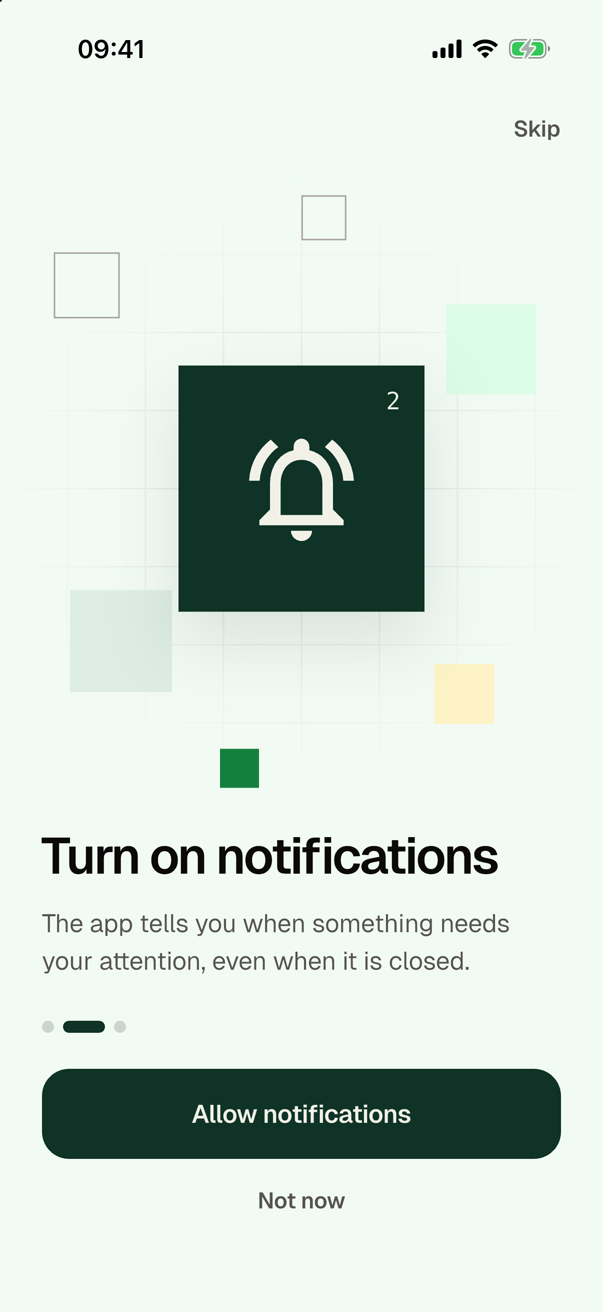
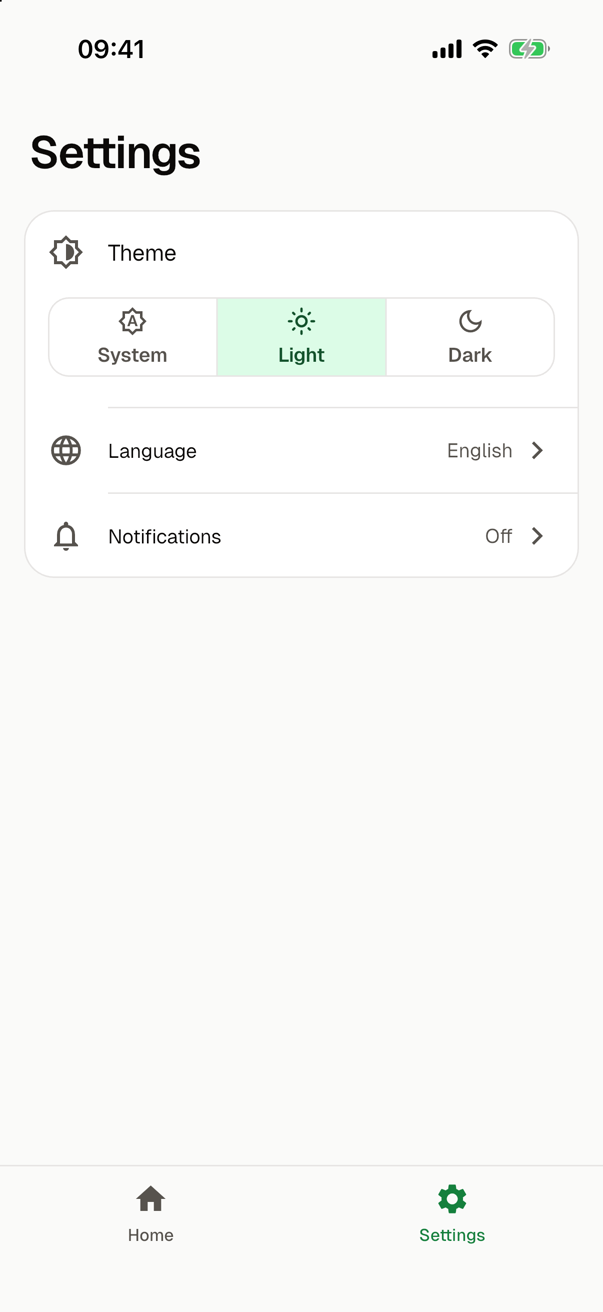
Since a user may skip the onboarding or say Not now, code that needs notifications checks appNotifications.permission and calls request() itself.
Taps
A tap on a notification reaches appNotifications.taps, a stream of NotificationTaps, each with the id and the data of its notification. appNotifications.launchTap is the tap that launched the app, known once bootstrap() is over. Read both once the first screen is shown, and navigate as the rest of the app does:
final tap = appNotifications.launchTap;
if (tap != null) openOrder(tap.data['order']);
appNotifications.taps.listen((tap) => openOrder(tap.data['order']));
A notification runs no code of the app when it shows. An error of the provider when the user comes back to the app, or one that its taps send, has no caller, so it reaches the handlers of the uncaught errors of the app, and the notifications go on.
Notifications with an owner
A notification may have an owner: code that shows it and handles its taps itself, such as the push role, which shows the messages that arrive in the foreground. Such a notification names its owner under notificationOwnerKey in its data and has a negative id, so that it never takes the place of a notification of the app. show() and schedule() refuse a negative id without an owner, and an owner with an id from 0 up.
appNotifications.taps and launchTap leave out the taps on a notification with an owner. appNotifications.tapsOf(owner) and launchTapOf(owner) give them to their owner, so the code of the app sees each tap once. scheduled() and cancelAll() take the notifications of an owner too.
Push messages
A backend sends push messages to the address of a device, through the provider of the push role. With firebase_messaging the address is the registration token of Firebase Cloud Messaging, and the backend sends through Firebase; see Cloud Messaging. Firebase sends to iOS only once you have uploaded the APNs key of your team to the Firebase project, a step by hand whose click-by-click guide also shows how to sign the app with your paid team.
The address
appPush.address is a ValueListenable<String?> of the address of this device. It is null until the platform gives one, and the app works without it. The app asks for it when it starts, without waiting for it, so the first frame never waits for the network, and again each time the user comes back to the app while it has none. Listen to it and send each new address to the backend: it may come late, and it may change.
import 'core/push/app_push.dart';

void sendAddressToBackend() {
  final address = appPush.address.value;
  if (address != null) backend.registerDevice(address);
  appPush.address.addListener(() {
    final address = appPush.address.value;
    if (address != null) backend.registerDevice(address);
  });
}
In debug mode the app prints each new address, so you can send this device a message by hand:
The address of this device for push messages: <the address>
On iOS the address needs a token of the Apple Push Notification service (APNs), which iOS gives only to a build signed with the entitlement aps-environment. The push role adds it to ios/Runner/Runner.entitlements with the value development, and the background mode remote-notification to Info.plist.
- The iOS simulator on a Mac gets a token. One on a macOS virtual machine, such as a hosted CI runner, never does.
- On an iPhone, signing with the entitlement needs a team of the paid Apple Developer Program, which is a step by hand of the app; see the click-by-click guide. With a free personal team, Xcode cannot sign the app. To run it on an iPhone then, remove the key
aps-environmentfromios/Runner/Runner.entitlements, and the app runs there without an address. The simulator needs no change. - The value
developmentsuits the builds that you run from Xcode. When Xcode exports the app for distribution, it takes the value of the provisioning profile.
Messages
A message is a PushMessage with data, and with an id, a title and a body when it has them. A value of its data that the platform gives as something other than a string is its JSON.
| The app is | A message with a title or a body | A message with data alone |
|---|---|---|
| In the foreground | Reaches appPush.messages, and shows as a notification. Where the system does not show it, the app shows it as a notification of its own through appNotifications, owned by the push role. | Reaches appPush.messages. |
| In the background, or closed | The system shows it, on Android in the channel of the notifications of the app. | Runs no code of the app. |
Either way the user has to allow the notifications of the app for a message to show. The push role asks for no permission itself: appNotifications.request() asks, as above. Images in a message do not show on iOS, which needs an extension of the app for them.
Taps on messages
appPush.taps tells of each tap on a message while the app runs, whether the system or the app showed it. appPush.launchMessage is the message whose tap launched the app, known once bootstrap() is over. Read both once the first screen is shown, and navigate as the rest of the app does. A tap on a message does not reach appNotifications.taps, so the code of the app sees each tap once.
For a provider
A module that provides one of these roles implements its interface, NotificationsService or PushService, and contributes the implementation as data of the role, as the providers of other service roles do; see Provide a role. The doc comments of the two interfaces in the app hold their contracts. In short:
- The function that creates the service asks the user nothing, and may be called again. The service that it returns then has what the device kept, such as the scheduled notifications or the address.
- A provider of notifications shows every notification in the channel
notificationChannelIdwith a high importance and, on Android, the small iconnotificationIcon, also in the foreground.scheduleshows a notification at about its time, also after a restart of the device, and needs no permission for exact alarms.showcancels the scheduled notification of its id.requestcompletes once the user answered, and opens the settings of the system where the platform has no question to show. - A provider of push messages never asks for the permission to show notifications, and never keeps the notifications of the app from showing in the foreground. Its
addressandlaunchMessagenever throw, and the address stays the same from one launch to the next unless the platform gives the device another, whichaddressChangestells of.platformShowsInForegroundsays whether the platform shows a message in the foreground. Where it does not, the service shows nothing of the message, and the app shows it.
The structural rules notifications.factory_calls and push.factory_calls check that only the files of the implementation import the file of the interface, and notifications.start_calls and push.start_calls that only bootstrap() starts the roles. Only a running app shows whether a provider keeps to the rest. SMF's CI checks both roles in running apps with a fixture provider of each, and with a broken one that each test must fail on; see Contributing.
The README and the guide for coding agents
The notifications role writes the section "Notifications" of the README of the app: how the app shows notifications, the permission and where the app asks for it, and the small icon of Android. The push role writes "Push messages": the address and what it needs on iOS, how a message shows, and the taps. Each provider adds a section of its own, such as how to send a test message.
The guide for coding agents of the app has the sections "Notifications" and "Push messages", with a note of the role and one of the provider in each.
In tests
A test of an app with these roles runs bootstrap(), which starts the service of each provider. The packages of the providers have no platform side for tests, so a test answers their channels itself; see local_notifications and firebase_messaging.
| A test that | Does this |
|---|---|
| scripts what a provider answers | It gives appNotifications.start() or appPush.start() a service of its own, a class of the test that implements NotificationsService or PushService. |
| checks what the next launch finds | It runs initNotifications() or initPush() again, which creates the service anew with what the device kept. The address is then null until the new service gives one. |
| brings the user back to the app | It may go through any state of the lifecycle: both roles look only at AppLifecycleState.resumed. |
A call of appNotifications made before the first initNotifications() waits for it. The mocks of the modules start as on a first launch: the app may not show notifications and has not asked, so the onboarding shows its step. A request grants the permission, so a test that asks goes on with an app that may show notifications.