paywall
| Package | Kind | Provides the role | Needs | Choose with |
|---|---|---|---|---|
smf_paywall | feature | none | purchases, values in .env, a router, a state manager | -m paywall |
paywall is the screen that sells the premium access of the app, and the screen that shows it to a user who has it. The paywall shows the plans of the current offer, each with the price that the store gives, and buys the plan that the user selects. The screen of the subscription shows the plan of the user, when it renews or ends, and the way to the page of the store where the user manages it.
The module keeps no purchases. It requires a module that provides the purchases role, such as revenuecat, and reaches it only through appPurchases, so the screens are the same whichever module that is; see Purchases. In an app with a settings screen, it adds a row that leads to the screen of the subscription. In an app with an onboarding, it adds a step that offers premium access.
The screens
| Screen | Route | Path | What it shows |
|---|---|---|---|
PaywallScreen | paywall.paywall | /paywall | The plans of the current offer and the button that buys the selected one, with what the stores ask a paywall to show. |
SubscriptionScreen | paywall.subscription | /paywall/subscription | The plan of the user, when it renews or ends, or that the access is for good, and a button to the page of the store where the user manages the plan. |
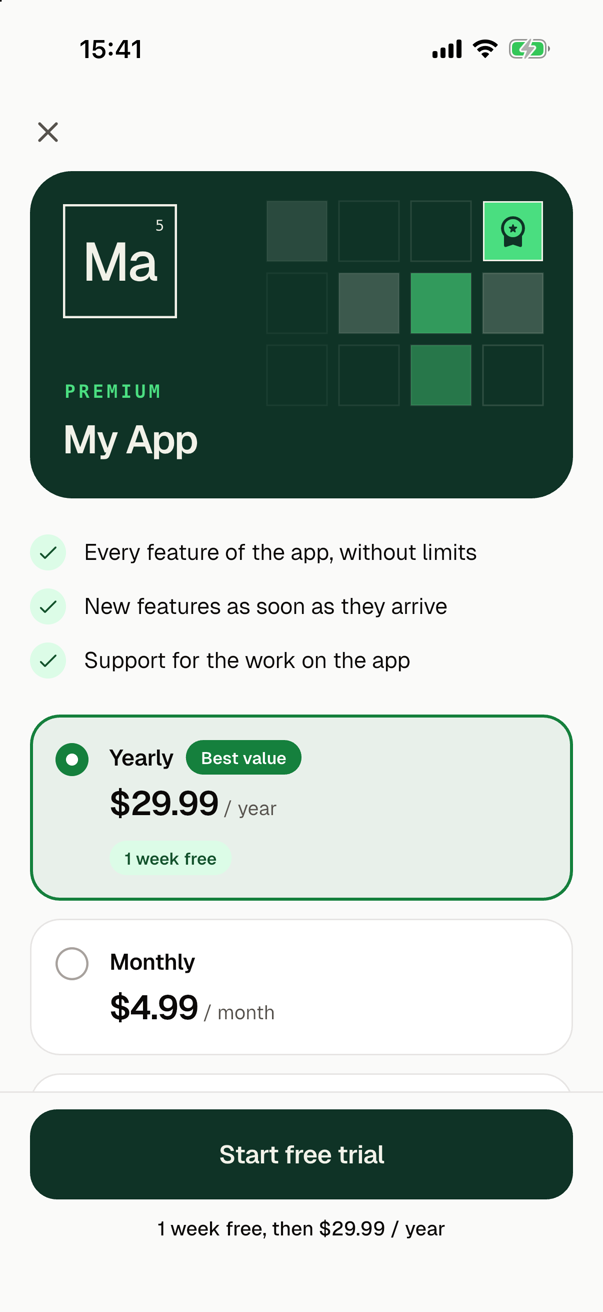
From the top, the paywall shows:
- a close button, outside what scrolls, whenever a page below is there to go back to;
- a card in the colours of Say My Frame, with the app as a cell of the periodic table and
Premiumabove its name. The symbol and the number in the cell come from the name of the app, as on the card of the start screen. On the right of the card the cells of a table light up one after another, and the last one shows the icon of premium access; - three benefits, each with a check: "Every feature of the app, without limits", "New features as soon as they arrive" and "Support for the work on the app";
- a card for each plan, in the order of the provider of purchases. A card shows the name of the plan, such as Yearly, its price with its period, such as
$29.99 / year, and its free trial or lower price at first, such as1 week free. A yearly plan that costs less than twelve months of a monthly plan in the same currency has the badge Best value. The paywall selects the first yearly plan, or else the first plan. Grey cards stand in while the plans load; - the button that buys the selected plan: Start free trial for a plan with a free trial, Buy for a plan paid once, and Subscribe for any other plan. Below it, for a plan with an intro offer, what the plan costs after it, such as
1 week free, then $29.99 / year; - the terms of the store of the platform, and the links Restore purchases, Terms of Use and Privacy Policy;
- in a debug build, a note for you, which names the keys of
.envthat are empty and what the provider of purchases says is missing, such as its key. A tap on a key copies it.
On a phone with room for it, the button and what follows it stay in sight at the bottom while the plans scroll. On a small phone, or with a large text size, they scroll with the rest, so that the plans keep their room.
When the plans do not load, the paywall says that they are not available right now and offers Try again, and a debug build shows the hint of the provider in its note. A call that fails shows a text of the app for its reason above the button, such as "No connection. Check the internet and try again.", with the developerHint below it in a debug build. A payment that waits for an approval, such as one that a parent approves, says so, and the access arrives later without another call. A restore that finds nothing says "No purchases to restore."
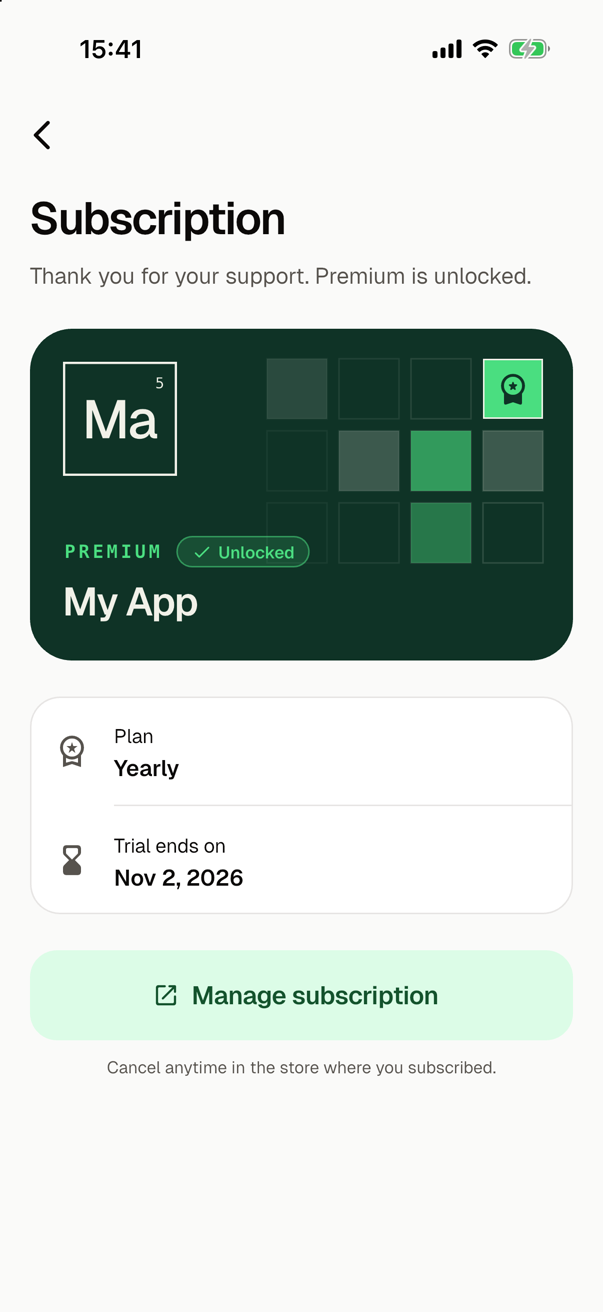
The screen of the subscription shows the same card with the badge Unlocked, a thank you, the plan and the date on which it renews, ends or ends its free trial, or Lifetime access for a plan paid once. Its button, Manage subscription, opens manageUrl, the page of the store where the user manages or cancels the plan, with "Cancel anytime in the store where you subscribed." below it. It has no restore: the paywall and the row of the purchases role on the settings screen restore.
Nothing navigates after a purchase
The route of the screen of the subscription asks for the condition PurchasesRole.premium. The module declares the guard paywall.hasPremium, which stands for that condition: its function, paywallHasPremium() of lib/features/paywall/paywall_guards.dart, returns appPurchases.hasPremium, and its target is the paywall. See Conditions of routes.
So no screen of the paywall closes itself or navigates after a purchase or a restore:
- A request for a route that needs premium access, from a user without it, opens the paywall over the page that the user is on. The request waits.
- The user buys a plan, or restores one. The access changes.
- The router closes the paywall and shows what was asked for: a
push()shows the route over the page and completes with the value of its page.
The close button and back drop the request, and its push() completes with null. When the access ends, as when a subscription expires, the router closes a page that needs it.
To sell from a button of your own, navigate to a route that needs premium access:
await context.nav.paywall.subscription().push<void>();
To keep a screen of your own for users with premium access, list PurchasesRole.premium in the conditions of its route in a module of yours, or add the full name of its route to the routes of paywall.hasPremium in routeGuards of lib/core/router/app_router.dart. The routes below such a route need the access too.
Code may also push /paywall itself for a user without the access, and the router closes it once the user has it. Do not push /paywall for a user with premium access: the flow of the guard is over then, so the router shows the screen that the app starts on.
The guard has the stage identity, since premium access depends on who the user is, and it brings the user back once it allows again. In an app with onboarding, the onboarding comes first. In an app with sign_in, the router asks the gate of the sign-in before this guard; see Guards of routes.
The row of the settings screen
In an app with a settings screen, the module gives it SubscriptionSetting: the row Subscription, with Active or Not active below its title. A tap asks for the screen of the subscription, so for a user without premium access the router opens the paywall over the settings screen first. The purchases role gives the same screen the row Restore purchases.
In an app without a settings screen, open the screen of the subscription from a screen of yours with context.nav.paywall.subscription().push<void>(), so that the user finds where to cancel.
The step of the onboarding
In an app with an onboarding, such as onboarding, the module gives the onboarding screen role the step paywall.offer. It has the stage offer, so the onboarding shows it after the steps that ask for permissions, such as the one of the notifications. The onboarding shows the step while the user has no premium access, and a new onboarding leaves it out once the user has it.
| Icon | Icons.workspace_premium_outlined |
| Title | Unlock premium |
| Text | Get every feature of the app, and the new ones as they arrive. |
| Button | See plans |
| Second button | Not now, which goes on without the paywall |
The page shows no price: the prices are on the paywall. See Plans calls showPaywall() of lib/features/paywall/paywall_step.dart, which pushes PaywallScreen on the navigator at the root of the app, over the onboarding. While the onboarding is on, a guard of the routes may keep the router from showing /paywall, so the paywall there is a route of its own, without a page of the router. The router does not close such a route, so showPaywall() closes it itself once the user has premium access, also from below a dialog over it. The onboarding goes on to the next page once the paywall is closed, whether by the close button, by back or after a purchase.
This is the one place where code of the module, not the router, closes the paywall.
Whose purchase it is
In an app with sign-in, a user may buy before signing in, such as from the step of the onboarding in an app that nobody uses without an account. A sign-up keeps the purchase in the new account. A sign-in to an account that exists already leaves the purchase with the user of the device until the user restores it. See Purchases.
What the stores ask of a paywall
The App Store and Google Play ask a screen that sells a subscription to show certain things. The paywall shows them:
| The stores ask for | The paywall shows |
|---|---|
| The name of the plan, its period and what the user gets | The name of each plan, its period, and the three benefits |
| The full price of each period, shown more clearly than any other price | The price that the store gives, the largest text of its card. A yearly plan is never shown by its price per month. |
| For a free trial or a lower price at first, how long it lasts and the price after it | The intro offer on the card, and what the plan costs after it right below the button |
| That the plan renews until the user cancels, and how to cancel | The terms of the store below the button: on iOS that the payment is charged to the Apple Account and that the user cancels at least 24 hours before the period ends, in the settings of the App Store; on Android that the user cancels anytime in Google Play, under Payments & subscriptions |
| A way to restore purchases | The link Restore purchases |
| Links to the terms of use and the privacy policy | The links Terms of Use and Privacy Policy, from .env |
| A visible way to close the screen without buying | The close button, which stays in sight at the top whenever a page is below the paywall. A paywall that go() shows alone has none, so push /paywall rather than go to it. |
A plan paid once says "One-time payment. No subscription." in place of the terms of renewal.
Values in .env
The module gives the role of the values in .env two keys:
| Key | Getter | What goes there |
|---|---|---|
PAYWALL_TERMS_URL | AppEnv.paywallTermsUrl | The address of your terms of use |
PAYWALL_PRIVACY_URL | AppEnv.paywallPrivacyUrl | The address of your privacy policy |
The App Store asks a paywall to link to both. While a value is empty, or is no web address with https or http and a host, the paywall leaves its link out. The exception is the terms of use on iOS, which then lead to the standard license agreement of Apple. A debug build names the empty keys in its note for you. Publishing the pages and filling in the keys is a step by hand of the app, with a click-by-click guide.
An address with an anchor, such as https://example.com/terms#refunds, goes into double quotes, since # after a plain value starts a comment; see Values in .env. The links open outside the app, in the browser, through url_launcher.
What it adds to the app
The look of the screens is the same in every app, in lib/features/paywall/:
| File | What it holds |
|---|---|
paywall_view.dart | PaywallView, the look of the paywall. |
subscription_view.dart | SubscriptionView, the look of the screen of the subscription. |
paywall_widgets.dart, paywall_card.dart | The widgets of both, among them PaywallWords, a text that keeps its words whole, and the card in the colours of Say My Frame. |
paywall_state.dart | PaywallState, the state of the paywall: the plans or why they did not load, the selected plan, the call on its way and what the last call ended with. Also which plan is selected first and which is the best value. |
paywall_texts.dart | The words that depend on a plan: its name, the period after its price, its intro offer, the label of the button, the terms of the store, and the text of each failure. |
paywall_links.dart | The addresses of the terms of use and of the privacy policy, from .env, and openPaywallLink(). |
paywall_guards.dart | paywallHasPremium(), the function of the guard. |
subscription_setting_row.dart, in an app with a settings screen | The look of the row Subscription. |
paywall_step.dart, in an app with an onboarding | paywallStepShows() and showPaywall(), the functions of the step. |
The views are plain Flutter widgets: a view gets the state and callbacks, and imports nothing that manages state. What keeps the state is a variant for each state manager:
With bloc | With riverpod | |
|---|---|---|
| The paywall | PaywallCubit in paywall_cubit.dart, which PaywallScreen provides | paywallProvider of paywall_notifier.dart, which lasts as long as the paywall |
| The screen of the subscription | SubscriptionCubit in subscription_cubit.dart | premiumProvider |
| The access of the user, for any widget | PremiumCubit of premium_cubit.dart, around the root of the app: context.watch<PremiumCubit>().state | premiumProvider of purchases_provider.dart: ref.watch(premiumProvider) |
| The purchases of the app | paywall_composition.dart creates the cubits with appPurchases | appPurchasesProvider of purchases_provider.dart, which a test overrides, and paywallLinkOpenerProvider there |
| The row of the settings screen | subscription_setting.dart, with PremiumCubit | subscription_setting.dart, with premiumProvider |
The module adds url_launcher: ^6.3.2 to the dependencies, and the package of the state manager with the constraint any, whose version the module of the state manager gives. It adds no asset: the card is drawn in code.
The module gives the roles of the app what they need:
| Role | What the module gives it |
|---|---|
| Router | The routes paywall.paywall and paywall.subscription, and the guard paywall.hasPremium of the stage identity, which stands for PurchasesRole.premium. |
| Values in .env | PAYWALL_TERMS_URL and PAYWALL_PRIVACY_URL. |
| Settings screen | SubscriptionSetting, in an app with a settings screen. |
| Onboarding screen | The step paywall.offer, in an app with an onboarding. |
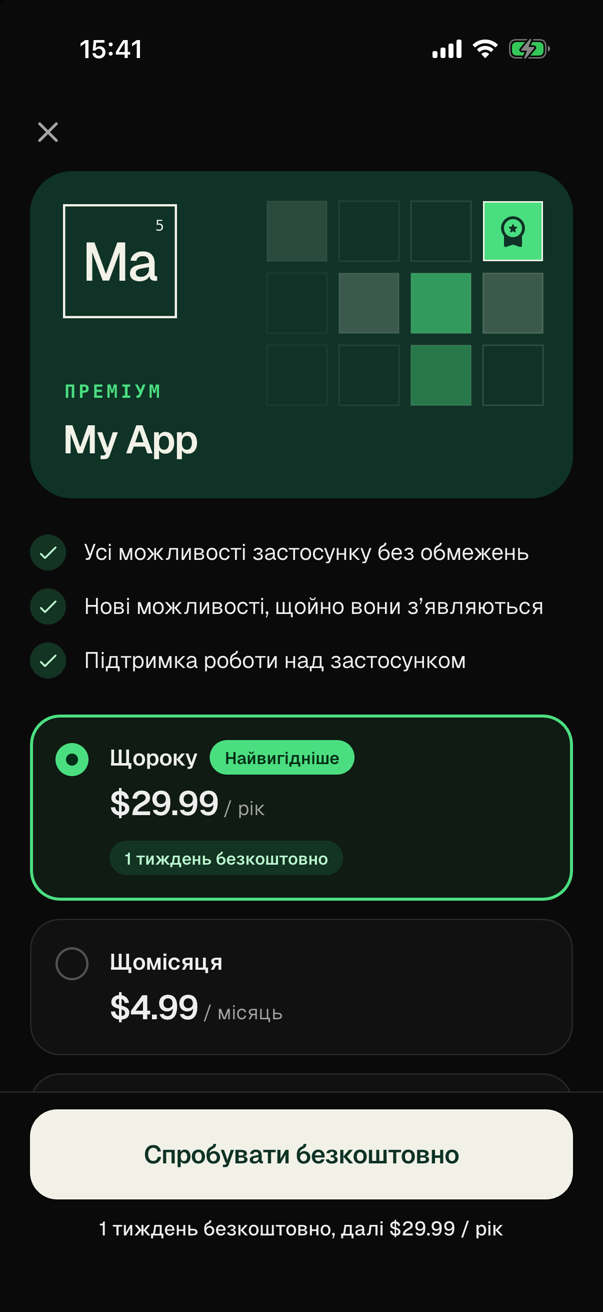
| Localization | Its 65 texts of the screens, the three of the row in an app with a settings screen, and the four of the step in an app with an onboarding, in English and in Ukrainian. |
In the guide for coding agents of the app, the module writes the section "Paywall": where its screens are and what shows and closes them, how to sell from a button, which files are the look and which the state, where the plans get their words and a failure its text, what the links need in .env, whose a purchase before a sign-in is, and what a widget test minds while a call is on its way. By the state manager of the app, it adds where the state of a screen is and how a widget reads the access, and in an app with an onboarding, how the step shows the paywall and who closes it. The README of the app gets the section "Paywall".
The texts
The texts of the screens are in English and in Ukrainian. In an app with a module that provides the localization, such as gen_l10n, they are texts of the app and follow its language. Their names start with paywall, such as paywallBenefitAll. An app without such a module shows them in English.
A text of the app has no parameters, so the paywall puts the words of a plan together from closed sets, with the price that the store gives:
| The paywall has words for | Anything else | |
|---|---|---|
| The period of a plan | every week, every 1, 2, 3 or 6 months, every year, and a plan paid once | The title of the product in the store as its name, and its price without a period |
| The length of an intro offer | 3 days, 1 or 2 weeks, 1, 2, 3 or 6 months, 1 year | Free trial or Introductory price, without its length |
These are the periods and the free trials of the App Store. Google Play also has periods such as every 4 weeks, which get the title of the product.
To make the texts yours:
- The benefits are the texts
benefitAll,benefitNewandbenefitSupportof the module. Change them to what premium access gives in your app. Withgen_l10n, they arepaywallBenefitAll,paywallBenefitNewandpaywallBenefitSupportinlib/l10n/app_en.arband in the file of each other language, andflutter gen-l10ngenerates the code after a change; see Languages. Without a module of the localization, they are English texts inpaywall_view.dart. - The texts of the step,
stepTitle,stepText,stepActionandstepLater, change the same way. - The words of a plan and the text of each failure are put together in
paywall_texts.dart.failureTextOf()there has a text for every reason of a failure, so the app does not compile once the purchases role has a reason without one.
Large text, motion and screen readers
On a small phone with a large text size:
- The texts of the screens, such as the benefits, the plans, the label of the button and the lines below it, break between their words and never inside one.
PaywallWordsmeasures the longest word of a text, and where that word would not fit the width, as on a narrow phone with a large text size, the text is only as large as that word allows. A no-break space keeps two words together, as in a price and its period. - A price grows at most by half with the text size of the device, stays on one line with its period, and stays the largest text of its card. The name of the app on the card, the title of the screen of the subscription and the small labels, such as
Premiumand Best value, also grow at most by half. - The letters and the number in the cell of the card keep their size, since they are part of the picture.
- On a phone of 320 by 480 points with the text at three times its size, the close button of a paywall over a page stays in sight at the top and at the end, and the paywall scrolls to its links, above the inset at the bottom of the screen.
On a device that asks for less motion, the parts of the screens and the cards of the plans are in their places in the first frame, and a button that is busy is disabled with its label rather than spinning. A screen reader reads the name of the app with Premium as a header, each plan with its name, its price, its intro offer and its badge, and a failure as it comes, since the failure is in a live region.
In tests
A widget test of the screens gives appPurchases.start() a service of its own, which scripts the offer, what a call answers and the access; see Purchases. The button spins while a purchase is on its way and after one that gave premium access, until the router closes the paywall. So a test that waits with pumpAndSettle() returns only once the router closed it, and until then it shows frames with pump().
The guard keeps a user without premium access from the screen of the subscription. SMF's CI checks the module in every app with it, through the provider of purchases and its mocks: a request for the screen of the subscription opens the paywall over the page, the close button drops the request, and once the user bought a plan the router closes the paywall and shows the screen of the subscription. It checks the cards and the texts of the plans in each language of the app, the text of each failure, the links from .env, the screen of the subscription for each kind of plan, the row of the settings screen, and the paywall on a small phone with a large text size, in both themes and with less motion. In an app with an onboarding, it checks that the step shows the paywall over the onboarding, that the close button, back and a purchase close it, and that the onboarding then goes on. See Contributing.
The mocks of the module buy the first plan through appPurchases before the app starts, so the tests of the other modules of an app with the paywall start with premium access, and the guard allows.
What the module does not do
- It shows the plans of the current offer alone. Which plans that are, and in which order, is set at the provider of purchases, such as in the default offering of RevenueCat.
- It changes no plan of a user who has one. The screen of the subscription leads to the page of the store, where the user changes or cancels the plan.
- It shows no price per month for a plan of a longer period, which Google Play does not allow as the main price.
- It asks for no sign-in: anyone may buy, and whose the purchase is follows the sign-in of the app.
Choosing it
smf create asks which features the app has. To choose this one without the question, with BLoC:
smf create my_app -m paywall,bloc
The module requires the purchases role and the values of .env, and as a feature it requires a router. smf create adds each when only one module provides it:
Adding flutter_core: the only provider of the app entry role, which every app needs.
Adding revenuecat: the only provider of the purchases role, which paywall requires.
Adding dart_define: the only provider of the env role, which paywall requires.
Adding go_router: the only provider of the router role, which paywall requires.
The screens keep their state with the state manager of the app, and two modules provide one, so a run without a terminal stops until -m names one:
Several modules provide the state management role, which paywall requires: bloc, riverpod. Add one of them to -m.
With a start screen, tabs, a settings screen and an onboarding, the paywall has its row and its step:
smf create my_app -m home,onboarding,settings,bottom_tabs,paywall,bloc